Contents
- 1 London’s cycle hire scheme: Santander Cycles, Ebikes: Docking Station, Map, Ride/trip cost, How to apply for the yearly / annual membership
- 2 Santander Cycles, Ebikes cost
- 3 Santander Cycles, Ebikes Membership Cost
- 4 How to Download the App with Santander Cycle TFL?
- 5 How to apply for the Santander Cycles membership?
- 6 Procedure to access/use the Santander cycle?
- 7 TFL London Santander Cycles Docking Station Service Updates this week
- 8 How to return the Santander cycle and place in the docking station in London, UK?
- 9 How to get / What is the Santander Cycles / ebikes discounts / promo code for Work, NHS Workers, Students, Scrappage Scheme?
- 10 Santander cycle Customer Care Contacts
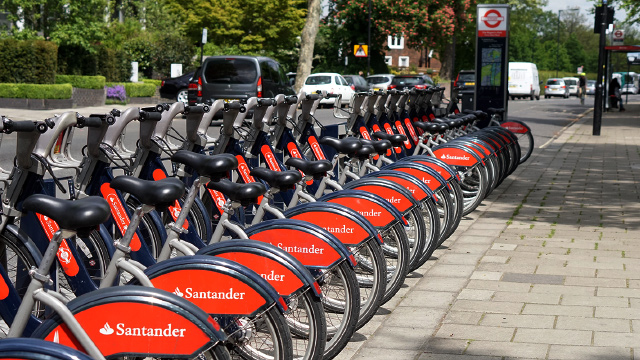
- 11 How many docking stations in London, UK
- 12 How to create an account with Santander Cycle TFL?
- 13 Santander Cycles, Ebikes Docking Station Map: Nearby Docking Station
- 14 List of the removed Santander Cycles docking stations in London
- 15 Santander Ebikes available at
- 16 Transport for London (TFL) Customer Care Contacts
- 17 What if I did not get the green light When I park/return the Santander cycle?
- 18 What to do if the docking station is full when you are going to return the Santander cycle/e-bike?
- 19 How to find the nearest docking station space to park when another docking station is full?
London’s cycle hire scheme: Santander Cycles, Ebikes: Docking Station, Map, Ride/trip cost, How to apply for the yearly / annual membership
Santander Cycles, Ebikes cost
- Single ride membership: £1.65 for a 30-minute ride (for a standard bike)
Santander Cycles, Ebikes Membership Cost
If you take a membership, 60 minutes ride will be free
Monthly membership cost: £20
Annual membership cost: £120
How to Download the App with Santander Cycle TFL?
- Download the Santander Cycles app (or update to the latest version) OR
- Go to your nearest docking station with your bank card OR
- Hire with a membership key
Download the App from Santander Cycle


How to apply for the Santander Cycles membership?
- First, you need to create an account online / through the app
- Visit https://santandercycles.tfl.gov.uk/sign-up
- Enter your name, email, contact number
Procedure to access/use the Santander cycle?
How to hire-ride-return the Santander cycle?
- Download the app and follow the instruction (OR)
- Visit the nearest docking station
- Select “Hire a cycle / e-bike”
- Take the printed release code
- Customers can hire up to 4 bikes at a time, but you require a separate release code for each cycle / e-bike
- Membership key with an active account can be used at the docking station.
- Now you can choose your cycle and ready to take a ride. Before that, please ensure your tyre, brake, bell is working properly
- Enter your release code into the docking points keypad, wait for the green light and pull the bike out
*Only Santander Cycles members can use e-bikes at the terminal
TFL London Santander Cycles Docking Station Service Updates this week
How to return the Santander cycle and place in the docking station in London, UK?
- You can park anywhere. Place the cycle in the empty docking point
- Wait for the green light to check the bike is securely docked to avoid unnecessary charges.
How to get / What is the Santander Cycles / ebikes discounts / promo code for Work, NHS Workers, Students, Scrappage Scheme?
TfL Santander Cycles Discount for Work
For the people who are using the Santander cycle to work will save 33-43% in the annual membership
TfL Santander Cycles discount for NHS Workers:
- NHS employee will get 50% discount on the annual membership
- Apply by sending email to TFL enquiries@santandercycles.tfl.gov.uk
- You will be sent a promo code. USe the promo code to avail the discount
TfL Santander Cycles Student Discounts
- For the students aged 18 and above can save 25% discount on the annual membership
- Apply here
TfL Santander Cycles Scrappage Scheme
- Those who applied for Vehicle Scrappage scheme can avail 25% discount on the annual membership
- Apply by sending email to TFL enquiries@santandercycles.tfl.gov.uk
- You will be sent a promo code. USe the promo code to avail the discount on the Santander cycle app / online
How to purchase and redeem Santander Cycle Promo Codes by phone / online / Santander cycle app?
- Call the Contact Centre on 0343 2220066 and get the promo code for Santander cycles
- Online at http://www.tfl.gov.uk/santandercycles;
- Download the Santander Cycle App and redeem
Santander cycle Customer Care Contacts
Address: 9th Floor, 5 Endeavour Square, London E20 1JN, United Kingdom.
Phone Number: 0343 222 6666
Opening Hours: Monday – Friday: 7.00 – 8.00, Saturday & Sunday: 9.00 – 6.00
How many docking stations in London, UK
Total docking station as of 2023: 800
Total cycles: More than 12,000
How to create an account with Santander Cycle TFL?
- Visit https://santandercycles.tfl.gov.uk/sign-up
- Enter your name, email, contact number
- Enter Your Password and Confirm your Password
- Select a Security Question and Answer
- Select the Terms and Condition
- Click the Signup Button
Santander Cycles, Ebikes Docking Station Map: Nearby Docking Station
Visit https://santandercycles.tfl.gov.uk/map


List of the removed Santander Cycles docking stations in London
- Harrington Square 2, Camden – for business requirement
- Jubilee Gardens, South Bank – relocated to Chicheley Street, South Bank
- New North Road 1, Hackney – for business requirement
- Rossmore Road, Marylebone – for a business requirement
- Smugglers Way, Wandsworth – part-suspended for development (back in February 2024)
- Great Marlborough Street, Soho – for development (expected live in late 2023)
- Walworth Road, Southwark – for demolition and major building work (expected late 2024)
- Bradmead, Battersea Park – for development (expected completion 2024)
- Hampstead Road (Cartmel), Euston – for HS2 works
- Olympia Way, Olympia – for development
Santander Ebikes available at
- BBC White City
- Lancaster Gate, Bayswater and more
Website: https://tfl.gov.uk/modes/cycling/santander-cycles
Transport for London (TFL) Customer Care Contacts
View the Transport for London (TFL) Customer Care Contacts through the above link.
What if I did not get the green light When I park/return the Santander cycle?
- You can call Santander cycle customer care contact center
What to do if the docking station is full when you are going to return the Santander cycle/e-bike?
- Select ‘No docking point free’ at the terminal and follow the on-screen directions to get an extra 15 minutes included
How to find the nearest docking station space to park when another docking station is full?
- You can select “Status of nearest docking station” at the terminal and check the space